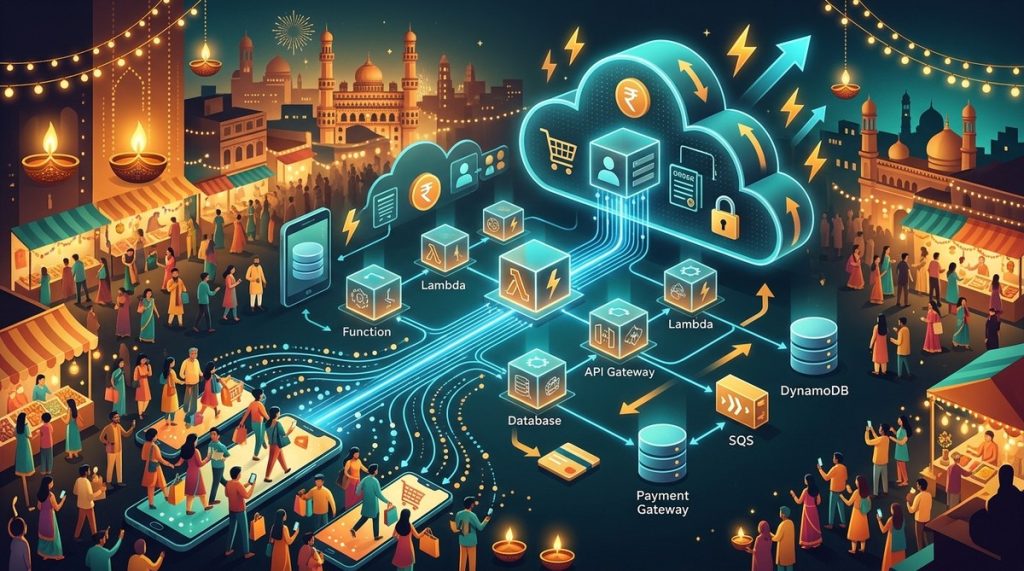
Diwali is coming. So is the Great Indian Festival, the Big Billion Days, and every other mega sale your ecommerce platform needs to survive. Your backend will see traffic that is ten times, sometimes fifty times, your normal load. If you are still managing your own servers, you are probably already stressed about scaling them up in time.
A serverless ecommerce backend for festive season traffic removes that stress. You do not provision servers. You do not worry about capacity. You write code, deploy it, and the cloud provider handles the rest. For a mid-sized Indian ecommerce company, this is the difference between a smooth Diwali and a site that crashes at checkout.
Serverless architecture lets your ecommerce backend scale automatically during Indian festive season traffic spikes. You avoid server management, pay only for what you use, and can handle 10x traffic without panic. This guide walks you through the core components, a step-by-step build process, common mistakes, and the tools you need for Diwali 2026.
Why Your Current Backend Will Struggle This Diwali
Indian festive season traffic is brutal. It is not a gradual increase. It is a sudden wall of requests at midnight on the first day of a sale. Your traditional setup with a fixed number of servers cannot handle that without over-provisioning or failing.
Here is what happens with a typical server-based approach:
- You guess the traffic. You guess wrong.
- You buy extra servers that sit idle for 11 months.
- You scramble to add capacity during the sale. It takes hours.
- A single node failure takes down a critical service.
A serverless backend solves all of this. Functions run on demand. Databases scale reads and writes automatically. Your only job is to write the business logic and configure the triggers.
The Core Components of a Serverless Ecommerce Backend
Before you start coding, understand the pieces. Here is what your architecture needs:
- API Gateway: The entry point for all client requests. It routes traffic to the right functions.
- Functions as a Service (FaaS): Your business logic lives here. Think AWS Lambda or Google Cloud Functions.
- Managed Database: Use a service like DynamoDB, Firestore, or PlanetScale. No server patching.
- Object Storage: Product images and static assets go into S3 or Cloud Storage.
- Message Queue: For order processing, email notifications, and inventory updates.
- CDN: Serve static content from edge locations close to your users in India.
These components work together to form a system that scales without manual intervention.
How to Build It: A Step-by-Step Process
Let me walk you through building a serverless ecommerce backend that can handle festive season traffic. I will use AWS services as examples, but the same principles apply to Google Cloud or Azure.
1. Set Up the API Gateway and Lambda Functions
Start with your API layer. Create an API Gateway that accepts requests from your frontend. Each endpoint maps to a Lambda function.
For example, your product listing endpoint looks like this:
GET /productstriggers a Lambda that queries your database.POST /cart/addtriggers a Lambda that writes to a cart table.POST /checkouttriggers a Lambda that creates an order and pushes a message to a queue.
Each Lambda function is stateless. It receives an event, processes it, and returns a response. If traffic spikes, Lambda spins up more instances automatically.
2. Choose the Right Database
Your database choice matters a lot for Indian festive season traffic. You need something that handles high read and write concurrency.
For most ecommerce backends, a NoSQL database like DynamoDB works well. It scales horizontally. You define your access patterns upfront using a single table design.
If you prefer SQL, use a serverless option like Amazon RDS Proxy with Aurora Serverless. It pauses when idle and scales up under load.
3. Implement a Message Queue for Order Processing
Do not process orders synchronously in the checkout Lambda. That slows down the response for the customer. Instead, push a message to a queue like AWS SQS or Google Pub/Sub.
A separate Lambda picks up the message, processes the payment, updates inventory, and sends the confirmation email. This decoupling keeps your checkout endpoint fast even during peak traffic.
4. Cache Aggressively with a CDN
Indian users are impatient. A slow page load means a lost sale. Use a CDN to cache product pages, category pages, and static assets.
For dynamic content, use a cache layer like Redis or a managed service like Amazon ElastiCache. Cache product details for a few seconds during a sale. That reduces the load on your database by a huge margin.
5. Set Up Monitoring and Alerts
You cannot watch logs during a sale. Set up dashboards that show you:
- Function error rates
- Database latency
- Queue depth
Use tools like AWS CloudWatch or Datadog. Set alerts for anything that goes above normal thresholds. If the error rate spikes, you get a notification before customers complain.
Common Mistakes That Break a Serverless Ecommerce Backend
Even experienced developers make these errors. Avoid them.
| Mistake | Why It Hurts | How to Fix |
|---|---|---|
| Cold starts on critical paths | First request after idle time is slow | Use provisioned concurrency for Lambda |
| Synchronous order processing | Checkout timeout during high traffic | Push to a queue and process async |
| No database connection pooling | Lambda instances overwhelm the database | Use a connection pooler or PgBouncer |
| Ignoring idempotency | Duplicate orders from retries | Use idempotency keys on payment calls |
| Over-caching stale data | Customers see wrong prices | Set short TTLs during sales |
Expert advice: “Serverless is not ‘set and forget’. You must test your system under load before Diwali. Run a load test that simulates 10x your normal traffic. Fix the bottlenecks you find. Do this a month before the sale, not the night before.”
A Practical Architecture for Indian Festive Season Traffic
Here is a concrete example using AWS that you can replicate:
- Frontend: Next.js hosted on Vercel or Netlify
- API Gateway: Amazon API Gateway
- Business Logic: AWS Lambda (Node.js or Python)
- Database: DynamoDB with single table design
- Cache: Amazon ElastiCache (Redis)
- Queue: AWS SQS
- Assets: Amazon S3 behind CloudFront CDN
- Search: Meilisearch or Algolia (serverless compatible)
This setup handles millions of requests during a sale without you touching a single server.
How to Test Your Backend Before Diwali 2026
Testing is non-negotiable. Here is a numbered list of steps to validate your system:
- Use a load testing tool like Artillery or k6. Write a script that simulates a user browsing products, adding to cart, and checking out.
- Run the test at 1x traffic first. Check that everything works.
- Ramp up to 5x traffic. Look for error rates and latency increases.
- Ramp up to 10x traffic. This is the target for most mid-sized Indian ecommerce sites.
- Check your database connection limits. Increase them if needed.
- Verify that your queue processes orders without delay.
- Test with a real UPI payment gateway sandbox. Do not skip this.
- Monitor your cold start times. Use provisioned concurrency for the most critical functions.
- Run the test for 30 minutes to simulate sustained traffic.
- Review the results. Fix any failures. Repeat until the system passes at 10x.
Tools and Services You Should Know
Here is a bullet list of services that work well for a serverless ecommerce backend in India:
- AWS Lambda for compute
- Google Cloud Functions as an alternative
- DynamoDB or Firestore for the database
- PlanetScale for serverless MySQL
- CloudFront or Fastly for CDN
- Auth0 or AWS Cognito for authentication
- Stripe or Razorpay for payments
- Sentry for error tracking
- Datadog or New Relic for monitoring
Each of these services has a generous free tier or pay-as-you-go pricing. You do not pay for idle capacity.
What to Do on the Day of the Sale
Your preparation is done. Now you just need to stay calm and watch the dashboards.
- Keep a terminal open with your monitoring dashboard.
- Have a rollback plan for each service. If a new deployment causes issues, revert to the previous version.
- Do not deploy new code during the sale. Freeze deployments 24 hours before.
- Keep your team on a group call. Share the dashboard link.
- If something breaks, fix it with a feature flag. Do not redeploy the whole system.
The beauty of serverless is that you mostly watch. The system handles the load.
Your Festive Season Survival Checklist
As you wrap up your preparation for the 2026 festive season, remember this: serverless is not magic. It is engineering. You have to design for scale, test for failure, and monitor for surprises. But when you get it right, your ecommerce backend becomes invisible. Customers shop. Orders process. You sleep.
Start building your serverless ecommerce backend for festive season traffic now. Do not wait until October. Test in July. Optimize in August. Sleep peacefully in October.
For more on related topics, read our guide on how to implement serverless architecture for high-traffic Indian websites and learn about caching strategies every Indian web developer must implement in 2026. If you are still deciding on your tech stack, our article on why your startup needs an API-first development approach in 2026 will help you make the right call.
Good luck. May your servers stay cool and your sales stay high.