Your team has spent months building a new checkout flow. The product catalogue is polished. The marketing team has promised a Diwali sale that will bring in crores in revenue. Then the clock strikes 8 PM on the first day of the sale. Your app slows to a crawl. Users see spinning loaders. Cart additions fail. Within minutes, your social media mentions turn into a customer support nightmare.
This scene plays out every year for Indian e-commerce platforms. The traffic spike from a flash sale, a festival launch, or a viral campaign can overwhelm systems that work perfectly on a normal Tuesday. The difference between a record-breaking sale and a technical disaster often comes down to a few architectural decisions made weeks or months before the event.
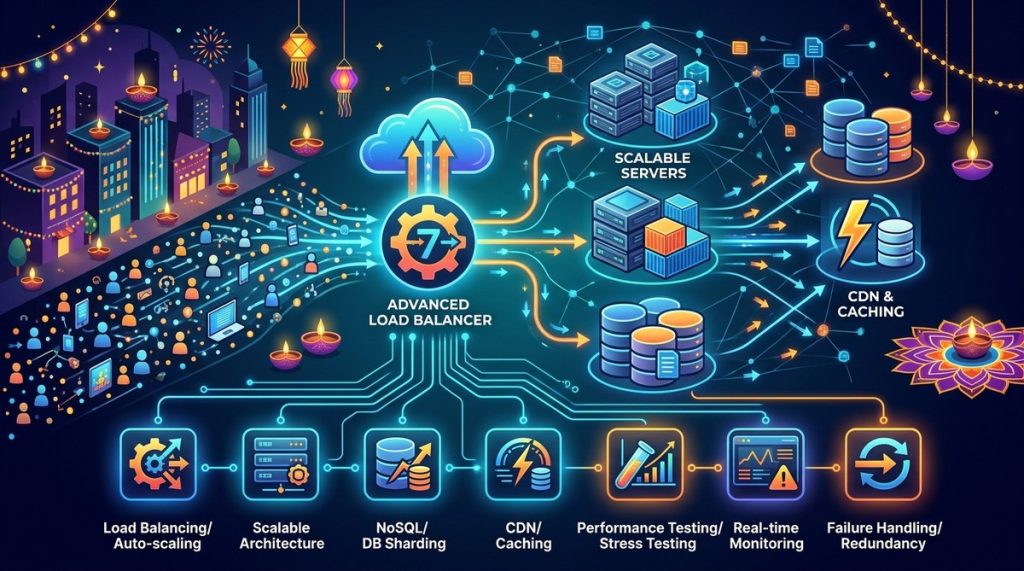
Handling traffic spikes web apps requires a layered approach: auto-scaling infrastructure, aggressive caching at multiple levels, database query optimization, load testing that simulates real Indian user patterns, and a robust fallback strategy. This guide covers seven techniques that help your app stay stable when lakhs of users hit your site simultaneously during Diwali, Dussehra, or any major sale event.
Why Indian Traffic Spikes Are Different
A global e-commerce site might see a 5x traffic increase during Black Friday. An Indian platform during a Diwali flash sale can see 20x or 30x spikes in minutes. The reasons go beyond just population size.
Indian users often switch between mobile data and Wi-Fi. They use older devices with limited memory. They expect instant page loads even on 4G networks that can be unreliable in certain areas. And they are not shy about abandoning a slow site and moving to a competitor.
Your architecture must handle not just volume, but also the unique patterns of Indian internet usage. Let us look at the techniques that make this possible.
1. Design for Auto-Scaling from Day One
Static infrastructure is the biggest enemy of handling traffic spikes web apps. If you provision servers for peak load, you waste money on 350 days of the year. If you provision for average load, you crash on the 15 high-traffic days.
The solution is auto-scaling. Your cloud infrastructure should spin up new instances automatically when traffic crosses a threshold.
Practical steps for auto-scaling
- Set up horizontal scaling for your web tier. Use Kubernetes or AWS ECS with HPA (Horizontal Pod Autoscaling). Configure it to add nodes when CPU usage hits 60% for more than 60 seconds.
- Scale your database read replicas. Most traffic spikes involve users browsing products. Create read replicas in different AWS regions or GCP zones. Route read queries to these replicas.
- Use a managed auto-scaling service. Cloud providers like AWS, GCP, and Azure offer auto-scaling for both VMs and serverless functions. If you are on a smaller budget, consider a VPS provider that supports API-driven scaling.
- Test your scaling triggers. Do not assume your auto-scaling works. Run a test where you simulate a 10x traffic jump and watch your infrastructure respond.
Expert advice: “Auto-scaling is not a set-and-forget feature. You must monitor your scaling logs after every major event. I have seen auto-scaling fail because a cloud provider hit a rate limit on instance creation during a Diwali sale. Always have a manual override plan.”
2. Cache Everything You Can
Caching is the single most effective technique for handling traffic spikes web apps. A cached response can be served in milliseconds. A database query for the same data might take 200 milliseconds. Multiply that by 50,000 concurrent users and you see the problem.
Where to cache
- CDN for static assets. Images of products, CSS files, and JavaScript bundles should never hit your origin server. Use a CDN with edge nodes in Mumbai, Delhi, Bangalore, and Chennai.
- Application-level caching. Use Redis or Memcached for frequently accessed data. Product listings, category pages, and search results are perfect candidates.
- Database query cache. MySQL and PostgreSQL have built-in query caches. Enable them and tune the cache size for your workload.
- HTTP caching headers. Set
Cache-ControlandETagheaders aggressively for public pages. Let browsers and CDNs do the heavy lifting.
The caching mistake most Indian sites make
They cache product pages but not the API responses that feed those pages. When a spike hits, the API layer crumbles. Cache at every layer of your stack.
For a deeper look at this topic, read our guide on caching strategies every Indian web developer must implement in 2026.
3. Optimize Your Database Queries
A slow database query is a silent performance killer. During a traffic spike, even a 50-millisecond query can become a 2-second bottleneck when the database connection pool is exhausted.
Techniques for database optimization
| Technique | What it does | Impact during spikes |
|---|---|---|
| Indexing | Creates lookup structures for common queries | Reduces query time by 80-90% |
| Connection pooling | Reuses database connections instead of opening new ones | Prevents connection limit errors |
| Read replicas | Offloads SELECT queries to replica databases | Frees up master for writes |
| Query denormalization | Stores precomputed data to avoid JOINs | Speeds up complex product listings |
| Partitioning | Splits large tables by date or category | Makes scans faster on festival data |
The hidden problem: N+1 queries
A product listing page that makes one query for the list and then one query per product is a disaster during a spike. Use eager loading in your ORM. Batch your queries. Use tools like pgbouncer for PostgreSQL or ProxySQL for MySQL.
If you want to master this skill, check out our detailed post on how to optimize database queries for high-traffic websites.
4. Load Test with Realistic Indian Scenarios
Most load tests fail because they simulate perfect network conditions. Indian users do not have perfect networks. They have variable latency, packet loss, and devices with limited memory.
How to build a realistic load test
- Use real user data. Your analytics tool can show you the most common user paths. Test those paths, not just the homepage.
- Simulate mobile users. At least 70% of your traffic during a festival sale will come from mobile devices. Use tools like BrowserStack or Selenium to simulate mobile browsers.
- Test from multiple Indian locations. Run your load test from servers in Mumbai, Bangalore, and Delhi. Network conditions vary significantly between cities.
- Include the payment flow. Many sites handle browsing well but crash during payment. Test the full checkout funnel.
- Test with concurrent users, not just requests per second. 10,000 simultaneous users doing one thing each is different from 1,000 users doing ten things each.
A practical load testing checklist
- Use k6 or Locust for scripting your tests.
- Set up a staging environment that mirrors production.
- Run tests at different times of day.
- Test with and without caching enabled.
- Record response times at the 95th and 99th percentiles.
5. Implement a Circuit Breaker Pattern
A circuit breaker prevents your entire system from failing when one component goes down. If the payment gateway is slow, the circuit breaker stops sending requests to it. Users see a “Payment temporarily unavailable” message instead of a spinning loader that never resolves.
How to implement it
- Use libraries like
Hystrix(for Java) orpybreaker(for Python). - Set thresholds: if a service fails 5 times in 30 seconds, open the circuit.
- Define fallback responses: show cached data, show a simplified page, or show a friendly error message.
- Monitor circuit states in your dashboard.
This pattern is especially useful for handling traffic spikes web apps because it prevents cascading failures. A slow database does not crash your entire site. It just degrades the features that depend on that database.
6. Use Feature Flags to Disable Non-Essential Features
During a massive traffic spike, not every feature needs to be available. Your product search and checkout are critical. Your blog comments, user reviews, and recommendation widgets can wait.
Feature flags let you turn off non-essential functionality without a deploy. You can disable heavy features during peak hours and re-enable them when traffic normalizes.
Features to consider disabling during spikes
- Real-time analytics tracking
- Social media sharing widgets
- Heavy JavaScript animations
- Third-party ad scripts
- Real-time chat support
Each of these features makes additional network calls and consumes server resources. Removing them during a spike can free up 20-30% of your capacity.
Learn more about this approach in our guide on why your web app needs a feature flag system in 2026 for faster Indian market launches.
7. Build a Graceful Degradation Plan
No matter how well you prepare, something can go wrong. A cloud provider might have an outage. A payment gateway might go down. Your database might hit a storage limit.
A graceful degradation plan defines what your app does when things fail. It is not about preventing failure. It is about failing well.
Elements of a good degradation plan
- Static fallback pages. If your app server is down, serve a static page from your CDN. This page can show a message, a contact number, or a link to your app store.
- Read-only mode. If your database write capacity is exhausted, switch to read-only mode. Users can browse products but cannot add to cart. This is better than a complete crash.
- Queue-based processing. Instead of processing orders synchronously, queue them. Use Redis queues or AWS SQS. The user sees a “Order confirmed” message, but the actual processing happens when the load reduces.
- Manual kill switch. Have a dashboard button that disables all non-critical features instantly. This should be a one-click action, not a multi-step process.
Putting It All Together: A Pre-Festival Checklist
Here is a practical checklist to run through before every major sale event:
- [ ] Auto-scaling configuration tested in the last 7 days
- [ ] CDN cache hit ratio above 85% for static assets
- [ ] Redis or Memcached configured for session storage and product data
- [ ] Database indexes reviewed and optimized for top 10 queries
- [ ] Load test completed with at least 2x expected traffic
- [ ] Circuit breakers configured for payment gateway and recommendation API
- [ ] Feature flags created for non-essential features
- [ ] Graceful degradation plan documented and shared with the team
- [ ] Monitoring alerts set up for CPU, memory, database connections, and error rates
- [ ] Rollback plan ready for the last deployment
Common Mistakes and How to Avoid Them
| Mistake | Why it hurts | Better approach |
|---|---|---|
| Scaling only the web tier | The database becomes the bottleneck | Scale web, cache, and database together |
| Using a single CDN provider | If the CDN goes down, your site is slow | Use a multi-CDN strategy or a fallback CDN |
| Ignoring mobile users | 70% of Indian traffic is mobile | Optimize images, reduce JavaScript, use lazy loading |
| Testing only from one location | Network conditions vary across India | Test from at least 3 Indian cities |
| No fallback for third-party services | A slow ad script can crash your site | Use async loading or disable third-party scripts during spikes |
Your Next Steps for Handling Traffic Spikes
Start with the areas that give you the biggest return for the least effort. Caching and database optimization alone can handle most traffic spikes if done correctly. Add auto-scaling and circuit breakers as your traffic grows.
Test everything before the next big sale. Do not wait until Diwali week to discover that your auto-scaling is misconfigured. Run a load test today. Fix the slow queries this week. Set up your feature flags next week.
The goal is not to build a system that never fails. The goal is to build a system that fails gracefully, scales predictably, and lets your users complete their purchases even when millions of people are shopping at the same time.
Indian festivals are some of the biggest e-commerce events in the world. Your web app deserves an architecture that treats them that way. Start implementing these techniques now, and your next Diwali sale will be a celebration of your engineering, not a test of your patience.